Audiences from real data
Segments come from CRM and ERP data, for example revenue, purchased products or open opportunities.
We set up Customer Insights so that a registration, a download or an event becomes a qualified contact for sales. We build audiences from CRM and ERP data such as revenue and purchased products, and AI helps with content and analysis. Several customers use the event module extensively, others move from HubSpot to Customer Insights with us.
Explore scope and workflow ↓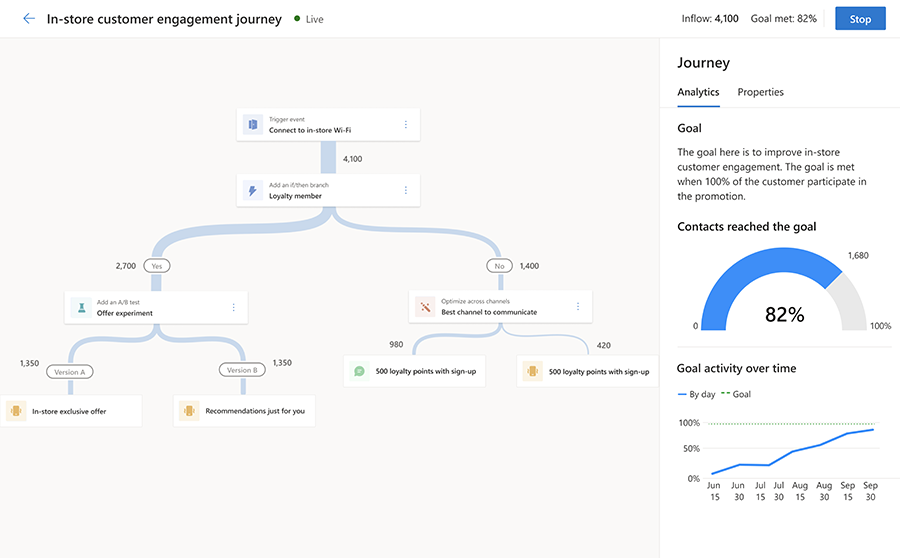 Enlarge image ↗
Segments come from CRM and ERP data, for example revenue, purchased products or open opportunities.
Webinars, trade fairs, downloads and existing customers get their own journeys with matching messages and branches.
Registration, sessions, attendee management and follow-up run in the event module. Several of our customers use it extensively, and contacts then go straight to sales.
We migrate customers from HubSpot to Customer Insights – Journeys. We carry over contacts and consent and rebuild the journeys in Journeys. Afterwards marketing and sales work in one system.
We agree with marketing and sales when a contact is ready. The lead arrives in Dynamics 365 Sales with topic, source and history.
AI helps write content, score contacts and analyse campaigns. Your team approves.
We map consent and preferences properly so that only people who agreed are contacted.
From campaign to order in one report. You see which campaigns bring revenue, not just open rates.
delivered by NXTGNyour systems and teams
Several customers use the Customer Insights event module extensively, from registration to the handover to sales. Other customers we migrate from HubSpot to Customer Insights – Journeys so marketing and sales work with the same contacts and figures.
A campaign does not end at a click. We connect audiences, consent and response with a traceable sales handover. Customer Insights and Journeys are aligned with your customer workflow.
Newsletters go to everyone because nobody knows who bought what.
Segments are built from revenue, products and open opportunities in CRM and ERP.
Customers receive content that fits them and unsubscribe less often.
Response rate per segment, unsubscribes.
Sales receives lists without context and calls the wrong people.
Contacts are scored on behaviour and data. Ready leads arrive in Dynamics 365 Sales with topic, source and history.
Sales talks to the right contacts at the right time.
Share of accepted leads, time to first conversation.
Marketing reports open rates, management asks about revenue.
Campaigns are linked to opportunities and orders and analysed in Power BI.
Budget goes to campaigns that bring business.
Pipeline and revenue per campaign.
We check against your data whether you also need Customer Insights – Data for unified customer profiles. The contacts in Dataverse are often enough to start.
Yes. We migrate customers from HubSpot to Customer Insights – Journeys. We carry over contacts and consent and rebuild the journeys in Journeys.
If customer data from many systems needs to come together, yes. To start, the contacts in Dataverse are often enough.
Yes, that is how our own website works. Forms create leads with topic, role and project stage directly in Dynamics 365, protected against spam.
By revenue, not open rates. We connect campaigns with opportunities and orders and show this in Power BI.
Yes. AI suggests copy and subject lines and helps with analysis. Your team approves.
We discuss your audiences, your occasions and the handover to your sales team.